
Risk Assessment Template

Instantly Create Your Risk Assessement, Just enter your details

Display Screen Equipment Risk Assessment

Use our risk assessment generator to create customised workplace safety documents. Learn more about Display Screen Equipment Risk Assessment Template below
Signature Limits Increased for Free Users

Due to increased demand and interest in our digital signatures and sign-off reports feature, we've increased the signature limit from 20 to 100 per shared document for free registered users. This gives you much more flexibility to share your documents, collect digital signatures from team members, stakeholders, and create comprehensive sign-off reports. Try it now!

Risk Assessment Generator
Guest
Generate Risk Assessments in 4 Easy Steps: Complete the assessment details below, then add risks from our pre-populated library or create custom ones. Add your logo and signatures, save your document, then share it with staff and workers to collect electronic signatures—ensuring everyone has read and understood the risk assessment. Export to PDF anytime!

Assessment Details

Loading Risk Assessment Generator...

Please wait while we prepare your workspace

Risk Assessments

How to Add Risks: Use "Add from Library" to quickly insert pre-written risk templates, or click "Add Custom" to write your own risk assessment from scratch. You can add multiple risks to this document.

No risks added yet. Add risks from the library or create custom risks.

Risk Assessment Matrix
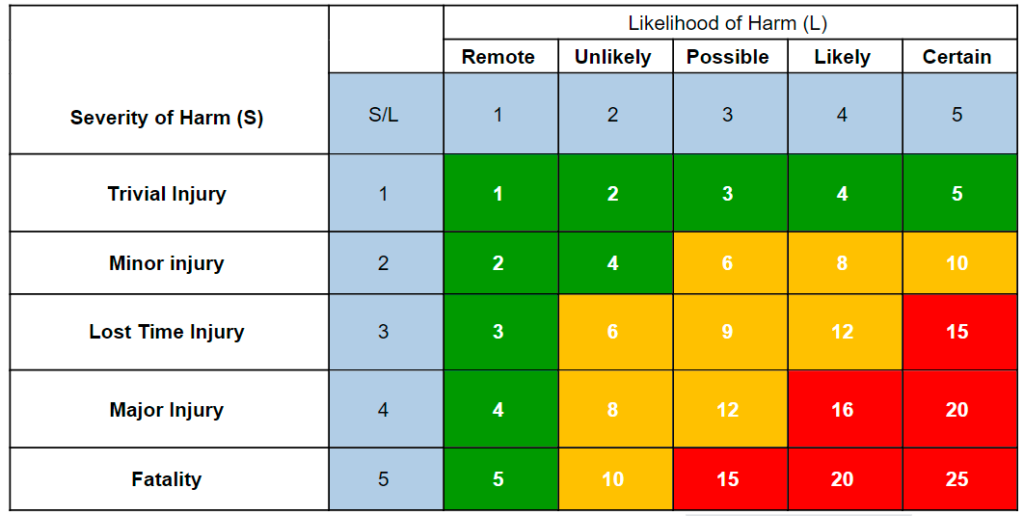
Risk Assessment Matrix

Likelihood

  • 5 = Certain
  • 4 = Likely
  • 3 = Possible
  • 2 = Unlikely
  • 1 = Remote

Severity

  • 5 = Fatality
  • 4 = Major Injury
  • 3 = Lost Time Injury
  • 2 = Minor injury
  • 1 = Trivial Injury

Risk Rating [L x S]

1-5 = Low
6-12 = Medium
13-25 = High

Logo & Signatures

Custom Branding Not Available

Create a free account to add your company logo to risk assessments.

Click to sign on behalf or leave blank for external approval

Review & Export

Choose how you'd like to export your risk assessment.

Preview Document

View exactly how your PDF will look before downloading

Download PDF

Get a secured, print-ready PDF of your risk assessment

Save Document

Save to your account for future editing and sharing

Share Documents & Collect Employee Sign-Offs

Save your document to unlock employee signature collection features available to all registered users:

Share Links

Send secure links to employees so they can read your risk assessments (limits vary by plan)

Collect Signatures

Employees sign to confirm they've read and understood the risk assessment

Detailed PDF Reports

Generate comprehensive sign-off reports with all signatures and timestamps

Proof of Compliance

Secure, encrypted signatures with access logs provide legally-defensible proof

Create a free account to share documents and collect employee signatures. Upgrade anytime for higher limits.

Important: The documents produced by this tool are templates only. They must be reviewed and approved by a competent person or your HSEQ representative prior to publication or circulation, in accordance with our Terms & Conditions.

Still Using Paper Sign-Off Sheets?

Once you've generated and saved your document, create a secure share link to distribute across any platform. Collect encrypted digital signatures from your team and generate professional sign-off reports.

Generate
Save
Share
Sign
Report
Try It Free

Testing with increased limits

Risk Assessment Description:

This free display screen equipment risk assessment template is designed for office workers, call‑centre agents and anyone who spends an hour or more each day at a computer. Whether you’re setting up a new workstation, working from home, or managing a shared office desk, this DSE risk assessment example provides pre‑filled hazards and control measures you can customise.

The template covers the key risks associated with DSE use, including poor ergonomics, eye strain, repetitive‑strain injuries, glare, inadequate lighting, cable trip hazards, temperature discomfort, noise and lack of training. It also includes the statutory requirements from the Health and Safety (Display Screen Equipment) Regulations 1992 such as regular eye tests, workstation assessments and break schedules.

Use this template for:

  • Workstation set‑up – ensure new desks meet ergonomic standards before staff start.
  • Remote‑working assessments – quickly evaluate home‑office setups.
  • Compliance documentation – demonstrate adherence to DSE Regulations, the Management of Health and Safety at Work Regulations 1999 and PUWER 1998.

Each hazard includes suggested control measures covering equipment selection, posture advice, lighting, break timing and training. All risks use a standard 5×5 likelihood‑severity matrix, with controlled severity matching the initial severity as required by HSE guidance.

Fully editable and shareable – customise hazards, add site‑specific risks, adjust control measures to match your conditions, then download as a PDF for records or share with your team.

Compliant with: Health and Safety (Display Screen Equipment) Regulations 1992, Management of Health and Safety at Work Regulations 1999, Provision and Use of Work Equipment Regulations 1998 (PUWER) and the Workplace (Health, Safety and Welfare) Regulations 1992.

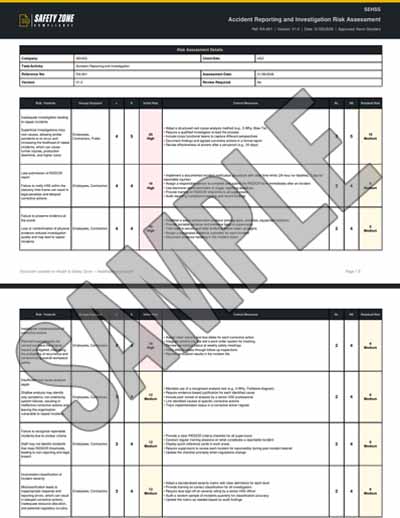
Sample PDF Document Image:
Frequently Asked Questions: