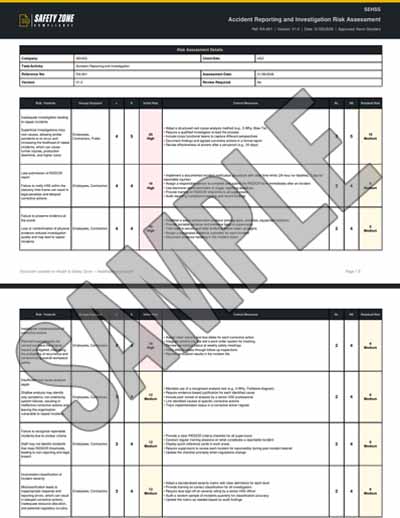

Loading Risk Assessment Creator
Please wait while we prepare your workspace
Risk Assessments
How to add risks: Use Add from Library for pre-written templates, or Add Custom to write your own.
Choose what goes in the document: Every risk is included by default — untick the box on any you don't want in the document.
Edit a risk: Click anywhere on the row to expand it and edit the details — ticked or unticked, both can be edited.
Step 1 must be completed before you can manage and edit the risks. Fill in the assessment details on Step 1 and click Next Step to unlock.
No risks added yet. Add risks from the library or create custom risks.
Risk Assessment Matrix
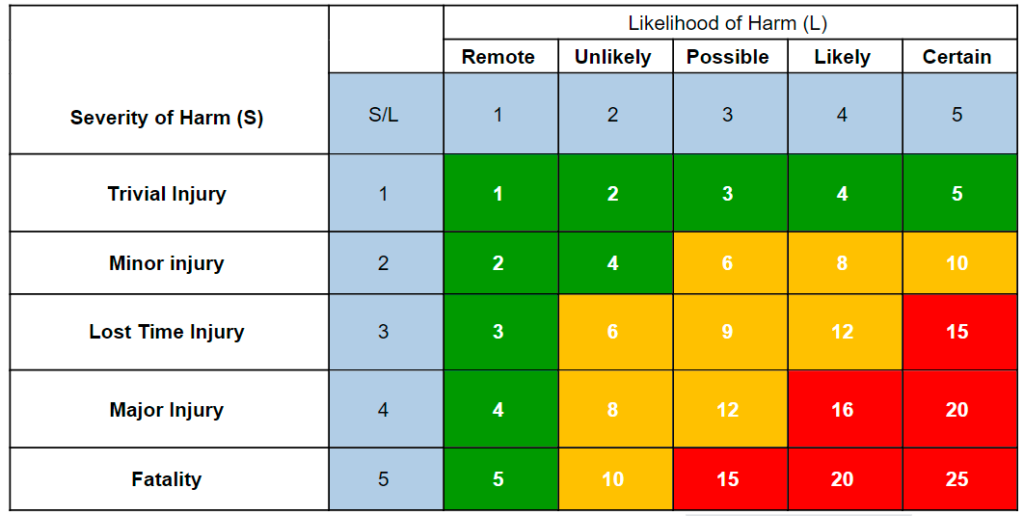
Likelihood
- 5 = Certain
- 4 = Likely
- 3 = Possible
- 2 = Unlikely
- 1 = Remote
Severity
- 5 = Fatality
- 4 = Major Injury
- 3 = Lost Time Injury
- 2 = Minor injury
- 1 = Trivial Injury
Risk Rating [L x S]
Logo, Branding & Sign-off
Company brandingStandard+
Upgrade to add your company logo and brand colours, and customise how your documents look.Available on our Standard and Pro plans.

Sign to confirm you have reviewed this risk assessment
Click to sign on behalf or leave blank for external approval
Review & Export
Export
Save & share
How sharing & packs work
Collecting sign-offs
All plansTurn a saved risk assessment into proof of a briefed workforce — send a secure link and your team signs to confirm they've read and understood it.
- Secure share links
- Collect e-signatures
- No account to sign
- Compliance audit trail
- QR signage posters
- PDF proof report
Shared pages carry Health & Safety Zone branding — upgrade to Standard/Pro to use your own logo & colours.
RAMS packs (Site Packs)
All plansBundle multiple saved documents into a single deliverable pack — a cover page + table of contents + all member document PDFs merged into one professional export.
- Cover page + table of contents
- All member PDFs merged into one
- Share via one secure link
- Recipients sign once for the whole pack
Share the pack with a customer or workforce — recipients review each document and sign once to acknowledge receipt of the entire pack.