
Risk Assessment Form Template

Instantly Create Your Risk Assessement, Just enter your details

Personal Search Risk Assessment

Use our risk assessment generator to create customised workplace safety documents. Learn more about Personal Search Risk Assessment Template below
Risk Assessment Generator
Guest
Generate Risk Assessments in 4 Easy Steps: Complete the assessment details below, then add risks from our pre-populated library or create custom ones. Add your logo and signatures, save your document, then share it with staff and workers to collect electronic signatures—ensuring everyone has read and understood the risk assessment. Export to PDF anytime!

Assessment Details

Loading Risk Assessment Generator...

Please wait while we prepare your workspace

Risk Assessments

How to add risks: Use Add from Library for pre-written templates, or Add Custom to write your own.

Choose what goes in the document: Each risk you add is off by default — tick the box on the ones you want included. You can have up to 3 ticked at once on your plan, or click Select up to my limit to fill all slots in one click.

Edit a risk: Click anywhere on the row to expand it and edit the details — ticked or unticked, both can be edited.

Step 1 must be completed before you can manage and edit the risks. Fill in the assessment details on Step 1 and click Next Step to unlock.

No risks added yet. Add risks from the library or create custom risks.

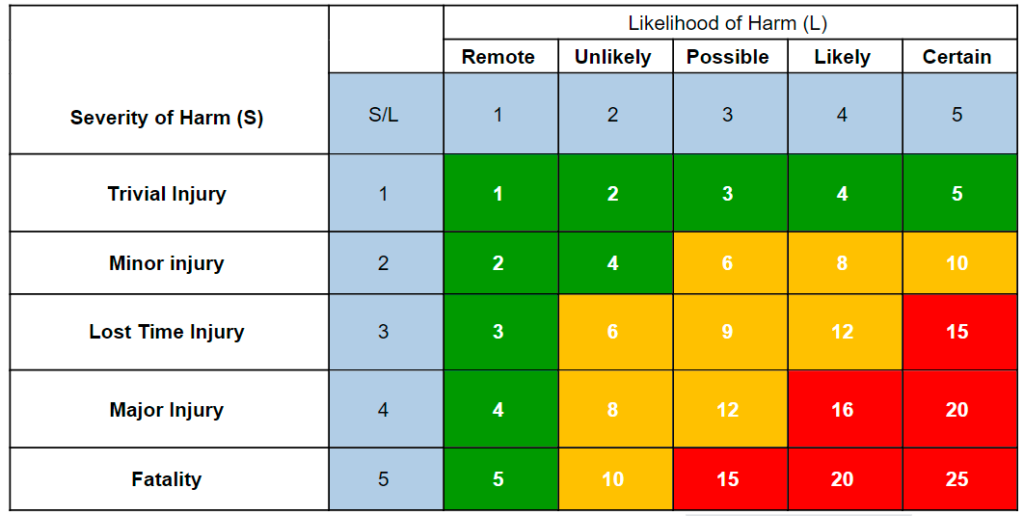
Risk Assessment Matrix
Risk Assessment Matrix

Likelihood

  • 5 = Certain
  • 4 = Likely
  • 3 = Possible
  • 2 = Unlikely
  • 1 = Remote

Severity

  • 5 = Fatality
  • 4 = Major Injury
  • 3 = Lost Time Injury
  • 2 = Minor injury
  • 1 = Trivial Injury

Risk Rating [L x S]

1-5 = Low
6-12 = Medium
13-25 = High

Logo & Signatures

Custom Branding Not Available

Create a free account to add your company logo to risk assessments.

Click to sign on behalf or leave blank for external approval

Review & Export

Choose how you'd like to export your risk assessment.

Preview Document

View exactly how your PDF will look before downloading

Download PDF

Get a secured, print-ready PDF of your risk assessment

Save Document

Save to your account for future editing and sharing

Share Documents & Collect Employee Sign-Offs

Save your document to unlock employee signature collection features available to all registered users:

Share Links

Send secure links to employees so they can read your risk assessments (limits vary by plan)

Collect Signatures

Employees sign to confirm they've read and understood the risk assessment

Detailed PDF Reports

Generate comprehensive sign-off reports with all signatures and timestamps

Proof of Compliance

Secure, encrypted signatures with access logs provide legally-defensible proof

Create a free account to share documents and collect employee signatures. Upgrade anytime for higher limits.

Important: The documents produced by this tool are templates only. They must be reviewed and approved by a competent person or your HSEQ representative prior to publication or circulation, in accordance with our Terms & Conditions.

Still Using Paper Sign-Off Sheets?

Once you've generated and saved your document, create a secure share link to distribute across any platform. Collect encrypted digital signatures from your team and generate professional sign-off reports.

Generate
Save
Share
Sign
Report
Try It Free

Increased Limits Available

Risk Assessment Description:

This free personal search risk assessment template is designed for security officers, private security firms and law‑enforcement agencies who need a quick, compliant way to assess the hazards associated with pat‑down and rub‑down searches. Whether you’re searching individuals at entry points, during arrests, or in high‑security venues, this personal search risk assessment example provides pre‑filled hazards and control measures you can customise.

The template covers all key risks for personal searches, including musculoskeletal strain from improper technique, assault risk, exposure to bodily fluids, privacy breaches, excessive force, inadequate documentation, discrimination, allergic reactions to gloves, psychological stress, poor lighting, escape risk, and evidence contamination. It also includes relevant long‑tail keywords such as free personal search risk assessment template, personal search hazards and control measures, security personal search safety assessment and personal search risk assessment download.

Use this template for:

  • Risk planning – quickly identify search‑related hazards before operations start.
  • Officer briefings – provide clear, actionable control measures to the team.
  • Compliance documentation – demonstrate adherence to the Police and Criminal Evidence Act 1984 (PACE) Code A, Human Rights Act 1998, Equality Act 2010 and Health and Safety at Work Act 1974.

Each hazard includes suggested control measures covering proper technique, use of PPE, documentation procedures, training, and monitoring. The risk matrix uses a standard 5×5 likelihood‑severity scoring, with controlled severity always matching the initial severity as required by HSE guidance.

Fully editable and shareable – customise hazards, add site‑specific risks, adjust control measures to match your conditions, then download as a PDF for records or share with your team.

Compliant with: Police and Criminal Evidence Act 1984 (PACE) Code A, Human Rights Act 1998, Equality Act 2010, Health and Safety at Work Act 1974, Control of Substances Hazardous to Health Regulations 2002 (COSHH).

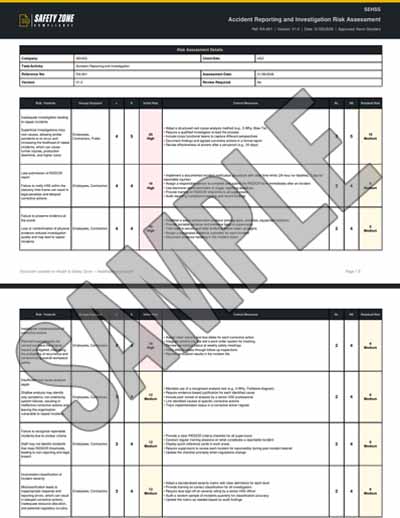
Sample PDF Document Image:

Risks covered in this Conducting Personal Searches (Pat-Down and Rub-Down) risk assessment

This Conducting Personal Searches (Pat-Down and Rub-Down) risk assessment template covers 15 assessed hazards, each scored before and after control measures on a 5×5 HSE risk matrix.

HazardInitial riskControlled risk
Physical assault by subject during search2010
Encounter with concealed weapons during search2010
Use of excessive force causing injury to subject155
Exposure to bodily fluids leading to infection128
Violation of privacy and dignity124
Inadequate decontamination of search area leading to cross‑contamination124
Musculoskeletal strain from improper search technique96
Psychological stress for officers and subjects96
Insufficient lighting causing missed contraband96
Officer fatigue and reduced vigilance93
Discrimination or bias during search84
Improper handling of seized items leading to evidence contamination84
Inadequate documentation of search details63
Allergic reaction to latex gloves63
Data protection breach of electronic search records63

Frequently asked questions

Are these risk assessment templates really free to download?

Yes — completely free. Over 1300 free UK risk assessment templates, free to use forever, no signup required for guests, no paywall. Customise to your workplace and download as a professional HSE-compliant PDF in minutes.

Can I download risk assessment templates in PDF or Word format?

Risk assessments download as a professional, HSE-compliant PDF — ready to print and file as-is. Word (.docx) export is not available for risk assessments, but you can fully customise every hazard, control measure, persons-at-risk entry and rating online before you download.

Are the risk assessment templates HSE-compliant?

Yes. Every template aligns with HSE guidance and the HSE 5-Step Risk Assessment process. They cover the requirements of the Management of Health and Safety at Work Regulations 1999, COSHH 2002, Manual Handling Operations Regulations 1992, Work at Height Regulations 2005, and other relevant UK regulations.

What industries do the risk assessment templates cover?

Over 1300 templates across every UK industry — painting, electrical, HVAC, plumbing, carpentry, concrete, solar panel installation, asbestos, scaffolding, working at height, manual handling, fall protection, hot works, confined space entry, lifting operations, kitchen fitting, plumbing, drywall, tiling, plastering, and many more.

What's the difference between a risk assessment form and a risk assessment template?

A risk assessment form is the blank document; a risk assessment template is a pre-filled form ready to customise. Our generator gives you both — a free interactive form you fill in plus over 1300 pre-written templates you can customise to your specific workplace.

Do I need to create an account to use the risk assessment templates?

No — guests can generate and download risk assessments for free without signing up. Register a free account if you want to save documents to your dashboard, edit them later, or share them for digital signatures.

Can I customise the risk assessment templates to my workplace?

Yes — fully. Edit hazards, control measures, persons at risk, likelihood and severity ratings, PPE requirements, and review schedules. Each template is a starting point you tailor to your specific operation.

How many risks can I add to a single risk assessment?

The number of risks (hazards) you can include in one assessment depends on your plan: guests get up to 3 risks, Free accounts up to 5 risks, Standard up to 15 risks, Pro unlimited risks, and Enterprise unlimited risks per assessment. You can add and preview every risk in a template, then tick the ones to include up to your plan limit — upgrade any time for more. See our pricing page for the full plan comparison.

Are these risk assessment templates valid for UK construction work?

Yes. Our construction-specific risk assessment templates align with HSE construction guidance, the Construction (Design and Management) Regulations 2015 (CDM 2015), and the Work at Height Regulations 2005. Templates cover scaffolding, working at height, concrete pouring, excavation, roofing, electrical installation, and more.

How often should I update my risk assessment?

Whenever there is reason to believe the assessment is no longer valid — after workplace changes, near-misses, accidents, new equipment, new substances, or new processes. HSE guidance recommends an annual formal review at minimum.

What is the HSE 5-step risk assessment process?

Step 1: Identify the hazards. Step 2: Decide who might be harmed and how. Step 3: Evaluate the risks and decide on precautions. Step 4: Record findings and implement them. Step 5: Review the assessment and update if necessary. Our interactive generator walks you through all 5 steps.

Can I use these risk assessment templates for self-employed work?

Yes. Self-employed workers are required to assess risks to themselves and anyone affected by their work. Our templates are suitable for sole traders, contractors, and small businesses.

Do you have RIDDOR-aligned risk assessment templates?

Yes. Several templates cover RIDDOR (Reporting of Injuries, Diseases and Dangerous Occurrences Regulations 2013) requirements — including accident reporting and investigation risk assessments. All RA templates support incident logging and review.