
Risk Assessment Form Template

Instantly Create Your Risk Assessement, Just enter your details

Members’ Club and Social-Club Operations Risk Assessment

Use our risk assessment creator tool to create customised workplace safety documents. Learn more about Members’ Club and Social-Club Operations Risk Assessment Template below
Risk Assessment Creator
Guest

Loading Risk Assessment Creator

Please wait while we prepare your workspace

Risk Assessments

How to add risks: Use Add from Library for pre-written templates, or Add Custom to write your own.

Choose what goes in the document: Every risk is included by default — untick the box on any you don't want in the document.

Edit a risk: Click anywhere on the row to expand it and edit the details — ticked or unticked, both can be edited.

Step 1 must be completed before you can manage and edit the risks. Fill in the assessment details on Step 1 and click Next Step to unlock.

No risks added yet. Add risks from the library or create custom risks.

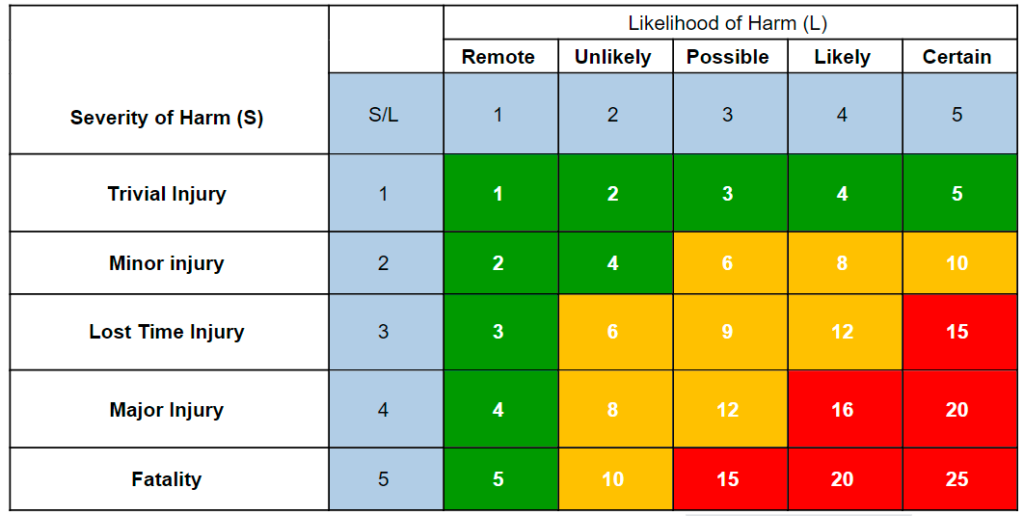
Risk Assessment Matrix
Risk Assessment Matrix

Likelihood

  • 5 = Certain
  • 4 = Likely
  • 3 = Possible
  • 2 = Unlikely
  • 1 = Remote

Severity

  • 5 = Fatality
  • 4 = Major Injury
  • 3 = Lost Time Injury
  • 2 = Minor injury
  • 1 = Trivial Injury

Risk Rating [L x S]

1-5 = Low
6-12 = Medium
13-25 = High

Logo, Branding & Sign-off

Company brandingStandard+

Add your company logo and brand colours, and customise how your documents look. Available on our Standard and Pro plans.

Add my branding →

For the best result, upload a PNG with a transparent background — this lets your logo blend cleanly into headers and signature blocks across every generated document. JPG is also accepted but will appear with a white background.
Recommended size: at least 500×150px. Max file size: 5MB.

Choose the background colour for the header on shared documents. Select a colour that complements your logo and brand identity.

Select your brand colour for accents and borders that matches your company logo. Use HEX format (e.g., #E4B700 for yellow).

Colours are automatically synced with your Branding settings.

Sign to confirm you have reviewed this risk assessment

Click to sign on behalf or leave blank for external approval

Review & Export

Your document is ready. Register free to download your PDF — it opens in a new tab and signs you in here automatically, so don't refresh or leave this page.

Preview Document

View exactly how your PDF will look before downloading

Your document is ready

Ready to download

Register a free account to download your PDF. Your document stays right here.

Register to Download →

No card required · instant access

Save Document

Not saved

Create a free account to save, share and collect sign-offs.

Sign in to save

Manage Document

Save your assessment first, then manage it, edit it and collect sign-offs here.

Manage Document

A free account keeps this assessment on your dashboard, where you can edit and re-export it any time.

Sign in to save

Create a RAMS Pack

Save this assessment first, then bundle it into a RAMS Pack (also called a Site Pack or Job Pack).

Create a RAMS Pack

A free account lets you bundle this assessment with others into a RAMS Pack (also known as a Site Pack or Job Pack). One link recipients can view or sign.

Sign in to save

Share Documents & Collect Employee Sign-Offs

Save your document to unlock employee signature collection features available to all registered users:

Share Links

Send secure links to employees so they can read your risk assessments (limits vary by plan).

Collect Signatures

Employees sign to confirm they've read and understood the risk assessment.

No Account Needed to Sign

Recipients read and sign straight from the link — no signup and no per-person fees.

Your Own Branding

Share pages and posters carry your logo and colours instead of ours (Standard and Pro).

Proof of Compliance

Encrypted signatures and access logs build a defensible audit trail, exportable as a PDF report.

QR Signage Posters

Printable A4 poster with a QR code, for doors, notice boards and message boards.

Create a free account to share documents and collect employee signatures. Upgrade anytime for higher limits.

Important: The documents produced by this tool are templates only. They must be reviewed and approved by a competent person or your HSEQ representative prior to publication or circulation, in accordance with our Terms & Conditions.

Still Using Paper Sign-Off Sheets?

Once you've generated and saved your document, create a secure share link to distribute across any platform. Collect encrypted digital signatures from your team and generate professional sign-off reports.

Generate
Save
Share
Sign
Report
Try It Free

Increased Limits Available

Risk Assessment Description:

This members’ club risk assessment template is designed for hospitality staff, bar managers and event coordinators who run members’ clubs and social‑club venues. Whether you’re serving drinks in the bar, organising private functions, managing cellar stock, overseeing late‑night operations, or handling kitchen and catering services, this social‑club risk assessment example provides pre‑filled hazards and control measures you can customise for your specific site.

The template covers all key risks for club operations, including intoxicated patron behaviour, manual handling of kegs, glassware and service trays, slips on wet floors, lone working during closing shifts, overcrowding, fire safety with bar and kitchen equipment, security incidents, noise exposure from live music, cellar handling of heavy stock, excessive alcohol consumption, chemical cleaning exposure, heat stress in kitchen areas, and first‑aid readiness for minor injuries. It deliberately excludes food‑hygiene, broader security or gym‑related hazards, focusing on the core hospitality environment of a members’ club.

Use this template for:

  • Pre‑event risk planning – quickly identify club‑specific hazards before a function starts.
  • Staff briefings and training – provide clear, actionable control measures to bar and service teams.
  • Compliance documentation – demonstrate adherence to the Licensing Act 2003 (Section 5 – licensing objectives) and relevant HSE guidance for catering and hospitality.

Each hazard includes suggested control measures covering safe manual handling, patron management, emergency procedures, equipment inspection and more. The risk matrix uses a standard 5×5 likelihood‑severity scoring, with controlled severity always matching the initial severity as required by HSE guidance.

Fully editable and shareable – customise hazards, add site‑specific risks, adjust control measures to match your conditions, and share with your team. Save your completed assessment and return to edit anytime.

Compliant with: Licensing Act 2003 (Section 5 – licensing objectives) and HSE catering and hospitality guidance (HSG71 and related publications).

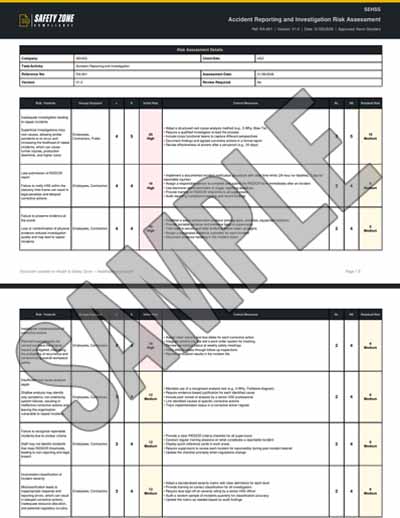
Sample PDF Document Image:

Risks covered in this Members' Club and Social-Club Operations risk assessment

This Members' Club and Social-Club Operations risk assessment template covers 15 assessed hazards, each scored before and after control measures on a 5×5 HSE risk matrix.

HazardInitial riskControlled risk
Intoxicated patron aggression and violence168
Overcrowding and emergency evacuation difficulty1510
Fire risk from bar equipment and cooking appliances1510
Excessive alcohol consumption leading to medical emergencies1510
Slips, trips and falls on wet or spilled liquids126
Lone working during closing shifts128
Cellar stock handling and low‑level confined spaces128
Manual handling of kegs and bar stock96
Theft and security breach93
Heat stress in kitchen/preparation area84
Noise exposure during live music or events63
Handling of glassware and breakage injuries64
Chemical cleaning exposure63
Manual handling of service trays and carts64
First‑aid readiness for minor injuries62

Frequently asked questions

Are these risk assessment templates really free to download?

Yes - completely free. Over 2400 free UK risk assessment templates, free to use forever, no paywall. Customise to your workplace and download as a professional HSE-compliant PDF in minutes.

Can I download risk assessment templates in PDF or Word format?

Risk assessments download as a professional, HSE-compliant PDF - ready to print and file as-is. Word (.docx) export is not available for risk assessments, but you can fully customise every hazard, control measure, persons-at-risk entry and rating online before you download.

Are the risk assessment templates HSE-compliant?

Yes. Every template aligns with HSE guidance and the HSE 5-Step Risk Assessment process. They cover the requirements of the Management of Health and Safety at Work Regulations 1999, COSHH 2002, Manual Handling Operations Regulations 1992, Work at Height Regulations 2005, and other relevant UK regulations.

What industries do the risk assessment templates cover?

Over 2400 templates across every UK industry - painting, electrical, HVAC, plumbing, carpentry, concrete, solar panel installation, asbestos, scaffolding, working at height, manual handling, fall protection, hot works, confined space entry, lifting operations, kitchen fitting, plumbing, drywall, tiling, plastering, and many more.

What's the difference between a risk assessment form and a risk assessment template?

A risk assessment form is the blank document; a risk assessment template is a pre-filled form ready to customise. Our generator gives you both - a free interactive form you fill in plus over 2400 pre-written templates you can customise to your specific workplace.

Do I need to create an account to use the risk assessment templates?

You can build and preview a risk assessment without an account. To download the PDF you'll need a free account - it takes less than a minute, costs nothing, and also lets you save documents to your dashboard, edit them later, and share them for digital signatures.

Can I customise the risk assessment templates to my workplace?

Yes - fully. Edit hazards, control measures, persons at risk, likelihood and severity ratings, PPE requirements, and review schedules. Each template is a starting point you tailor to your specific operation.

How many risks can I add to a single risk assessment?

The number of risks (hazards) you can include in one assessment depends on your plan: guests get unlimited risks, Free accounts unlimited risks, Standard unlimited risks, Pro unlimited risks, and Enterprise unlimited risks per assessment. You can add and preview every risk in a template, then tick the ones to include up to your plan limit - upgrade any time for more. See our pricing page for the full plan comparison.

Are these risk assessment templates valid for UK construction work?

Yes. Our construction-specific risk assessment templates align with HSE construction guidance, the Construction (Design and Management) Regulations 2015 (CDM 2015), and the Work at Height Regulations 2005. Templates cover scaffolding, working at height, concrete pouring, excavation, roofing, electrical installation, and more.

How often should I update my risk assessment?

Whenever there is reason to believe the assessment is no longer valid - after workplace changes, near-misses, accidents, new equipment, new substances, or new processes. HSE guidance recommends an annual formal review at minimum.

What is the HSE 5-step risk assessment process?

Step 1: Identify the hazards. Step 2: Decide who might be harmed and how. Step 3: Evaluate the risks and decide on precautions. Step 4: Record findings and implement them. Step 5: Review the assessment and update if necessary. Our interactive generator walks you through all 5 steps.

Can I use these risk assessment templates for self-employed work?

Yes. Self-employed workers are required to assess risks to themselves and anyone affected by their work. Our templates are suitable for sole traders, contractors, and small businesses.

Do you have RIDDOR-aligned risk assessment templates?

Yes. Several templates cover RIDDOR (Reporting of Injuries, Diseases and Dangerous Occurrences Regulations 2013) requirements - including accident reporting and investigation risk assessments. All RA templates support incident logging and review.