

Risk Assessment Form Template

Instantly Create Your Risk Assessement, Just enter your details

Angle Grinder Risk Assessment

Use our risk assessment creator tool to create customised workplace safety documents. Learn more about Angle Grinder Risk Assessment Template below
Risk Assessment Creator
Guest

Loading Risk Assessment Creator

Please wait while we prepare your workspace

Risk Assessments

How to add risks: Use Add from Library for pre-written templates, or Add Custom to write your own.

Choose what goes in the document: Every risk is included by default — untick the box on any you don't want in the document.

Edit a risk: Click anywhere on the row to expand it and edit the details — ticked or unticked, both can be edited.

Step 1 must be completed before you can manage and edit the risks. Fill in the assessment details on Step 1 and click Next Step to unlock.

No risks added yet. Add risks from the library or create custom risks.

Risk Assessment Matrix
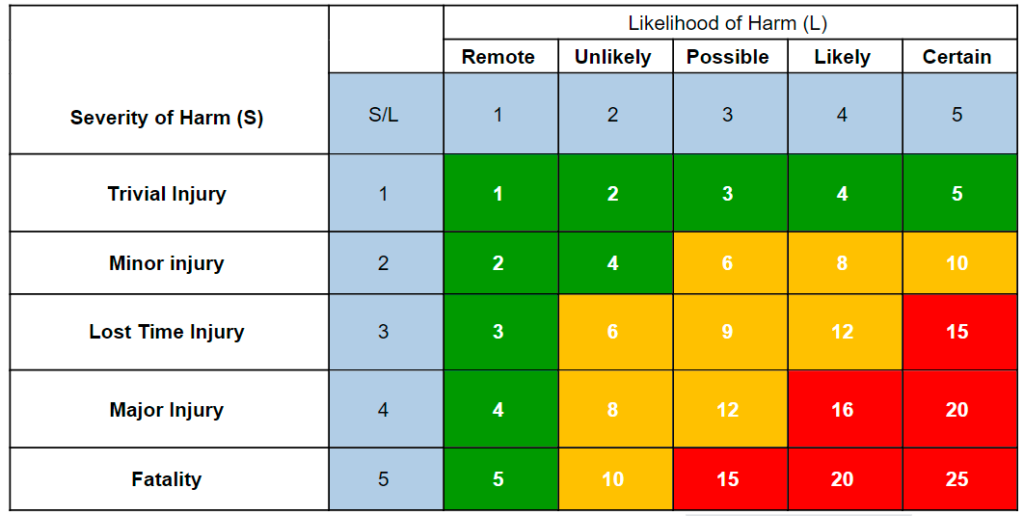
Risk Assessment Matrix

Likelihood

  • 5 = Certain
  • 4 = Likely
  • 3 = Possible
  • 2 = Unlikely
  • 1 = Remote

Severity

  • 5 = Fatality
  • 4 = Major Injury
  • 3 = Lost Time Injury
  • 2 = Minor injury
  • 1 = Trivial Injury

Risk Rating [L x S]

1-5 = Low
6-12 = Medium
13-25 = High

Logo, Branding & Sign-off

Company brandingStandard+

Upgrade to add your company logo and brand colours, and customise how your documents look.Available on our Standard and Pro plans.

Add my branding →

Sign to confirm you have reviewed this risk assessment

Click to sign on behalf or leave blank for external approval

Review & Export

Your risk assessment is ready. Register free to download your PDF — it opens in a new tab and signs you in here automatically, so don't refresh or leave this page.

Export

Preview risk assessment
See exactly how it looks before downloading.
Download PDF .PDF
Register a free account to download — takes seconds, your risk assessment stays right here.

Save & share

Save to account Not saved
Sign in to save and manage your risk assessments.
Manage risk assessment
Sign in to manage, edit and re-export this risk assessment.
Save first, then manage, edit and re-export it here.
Manage, edit and re-export your saved risk assessment.
Create a RAMS pack
Sign in to bundle saved documents into a pack.
Save first, then merge saved documents into one pack.
Merge saved documents into one cover + contents pack.
Sign in Create
Share & collect sign-offs
Create a free account to share and collect sign-offs.
Save first, then send a secure link for your team to sign.
Send a secure link — your team reads & signs to confirm.

How sharing & packs work

Collecting sign-offs

All plans

Turn a saved risk assessment into proof of a briefed workforce — send a secure link and your team signs to confirm they've read and understood it.

  • Secure share links
  • Collect e-signatures
  • No account to sign
  • Compliance audit trail
  • QR signage posters
  • PDF proof report

Shared pages carry Health & Safety Zone branding — upgrade to Standard/Pro to use your own logo & colours.

RAMS packs (Site Packs)

All plans

Bundle multiple saved documents into a single deliverable pack — a cover page + table of contents + all member document PDFs merged into one professional export.

  • Cover page + table of contents
  • All member PDFs merged into one
  • Share via one secure link
  • Recipients sign once for the whole pack

Share the pack with a customer or workforce — recipients review each document and sign once to acknowledge receipt of the entire pack.

Important: The documents produced by this tool are templates only. They must be reviewed and approved by a competent person or your HSEQ representative prior to publication or circulation, in accordance with our Terms & Conditions.

Still Using Paper Sign-Off Sheets?

Once you've generated and saved your document, create a secure share link to distribute across any platform. Collect encrypted digital signatures from your team and generate professional sign-off reports.

Generate
Save
Share
Sign
Report
Try It Free

Increased Limits Available

Risk Assessment Description:

This free angle grinder risk assessment template is designed for construction, metalwork, stone and concrete applications where a handheld power tool is used for cutting, grinding or polishing. Whether you are trimming rebar, shaping steel, grinding welds, or polishing concrete surfaces, this angle grinder safety assessment provides pre‑filled hazards and control measures that can be customised to your specific job.

The template covers the most common risks associated with angle grinder use, including cuts, flying fragments, sparks/fire, noise, vibration, dust exposure and electrical hazards. It is suitable for metal cutting risk assessments, grinding safety checklists, and concrete polishing hazard reviews.

Use this template for:

  • Cutting metal or rebar – handheld grinding, deburring or trimming tasks.
  • Grinding welds and surfaces – removal of slag, smoothing steel.
  • Polishing concrete or stone – surface preparation before sealing.
  • Portable power‑tool projects – on‑site repairs where a corded or cordless grinder is required.

Each hazard includes suggested control measures covering personal protective equipment, safe work practices, tool inspection and maintenance. All risks are pre‑scored using the standard 5×5 risk matrix — simply review, adjust to your site conditions and download as PDF.

Fully editable and shareable – customise hazards, add additional risks, modify control measures to match your environment, and share with your team. Save the completed assessment and return to edit anytime.

Compliant with: Provision and Use of Work Equipment Regulations 1998 (PUWER), Control of Substances Hazardous to Health (COSHH) for dust, Noise at Work Regulations 2005, and relevant HSE guidance on handheld power tools.

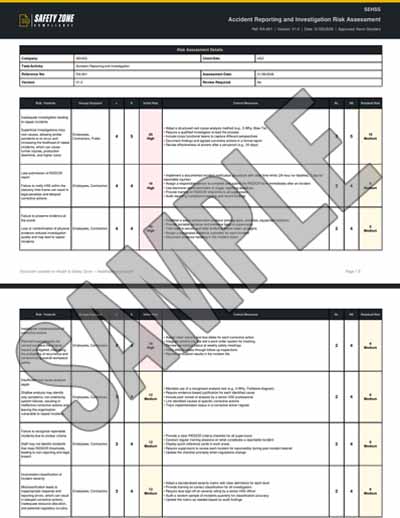
Sample PDF Document Image:

Risks covered in this Angle Grinder risk assessment

This Angle Grinder risk assessment template covers 10 assessed hazards, each scored before and after control measures on a 5×5 HSE risk matrix.

HazardInitial riskControlled risk
Contact with rotating disc – cuts and lacerations205
Flying fragments and projectiles205
Sparks and fire ignition155
Tool failure / disc breakage155
Kickback / loss of control155
Noise exposure and hearing loss124
Hand‑Arm Vibration Syndrome (HAVS)124
Dust inhalation – silica & metal particles124
Electrical shock105
Ergonomic strain – awkward postures93

Frequently asked questions

Are these risk assessment templates really free to download?

Yes - completely free. Over 2500 free UK risk assessment templates, free to use forever, no paywall. Customise to your workplace and download as a professional HSE-compliant PDF in minutes.

Can I download risk assessment templates in PDF or Word format?

Risk assessments download as a professional, HSE-compliant PDF - ready to print and file as-is. Word (.docx) export is not available for risk assessments, but you can fully customise every hazard, control measure, persons-at-risk entry and rating online before you download.

Are the risk assessment templates HSE-compliant?

Yes. Every template aligns with HSE guidance and the HSE 5-Step Risk Assessment process. They cover the requirements of the Management of Health and Safety at Work Regulations 1999, COSHH 2002, Manual Handling Operations Regulations 1992, Work at Height Regulations 2005, and other relevant UK regulations.

What industries do the risk assessment templates cover?

Over 2500 templates across every UK industry - painting, electrical, HVAC, plumbing, carpentry, concrete, solar panel installation, asbestos, scaffolding, working at height, manual handling, fall protection, hot works, confined space entry, lifting operations, kitchen fitting, plumbing, drywall, tiling, plastering, and many more.

What's the difference between a risk assessment form and a risk assessment template?

A risk assessment form is the blank document; a risk assessment template is a pre-filled form ready to customise. Our generator gives you both - a free interactive form you fill in plus over 2500 pre-written templates you can customise to your specific workplace.

Do I need to create an account to use the risk assessment templates?

You can build and preview a risk assessment without an account. To download the PDF you'll need a free account - it takes less than a minute, costs nothing, and also lets you save documents to your dashboard, edit them later, and share them for digital signatures.

Can I customise the risk assessment templates to my workplace?

Yes - fully. Edit hazards, control measures, persons at risk, likelihood and severity ratings, PPE requirements, and review schedules. Each template is a starting point you tailor to your specific operation.

How many risks can I add to a single risk assessment?

The number of risks (hazards) you can include in one assessment depends on your plan: guests get unlimited risks, Free accounts unlimited risks, Standard unlimited risks, Pro unlimited risks, and Enterprise unlimited risks per assessment. You can add and preview every risk in a template, then tick the ones to include up to your plan limit - upgrade any time for more. See our pricing page for the full plan comparison.

Are these risk assessment templates valid for UK construction work?

Yes. Our construction-specific risk assessment templates align with HSE construction guidance, the Construction (Design and Management) Regulations 2015 (CDM 2015), and the Work at Height Regulations 2005. Templates cover scaffolding, working at height, concrete pouring, excavation, roofing, electrical installation, and more.

How often should I update my risk assessment?

Whenever there is reason to believe the assessment is no longer valid - after workplace changes, near-misses, accidents, new equipment, new substances, or new processes. HSE guidance recommends an annual formal review at minimum.

What is the HSE 5-step risk assessment process?

Step 1: Identify the hazards. Step 2: Decide who might be harmed and how. Step 3: Evaluate the risks and decide on precautions. Step 4: Record findings and implement them. Step 5: Review the assessment and update if necessary. Our interactive generator walks you through all 5 steps.

Can I use these risk assessment templates for self-employed work?

Yes. Self-employed workers are required to assess risks to themselves and anyone affected by their work. Our templates are suitable for sole traders, contractors, and small businesses.

Do you have RIDDOR-aligned risk assessment templates?

Yes. Several templates cover RIDDOR (Reporting of Injuries, Diseases and Dangerous Occurrences Regulations 2013) requirements - including accident reporting and investigation risk assessments. All RA templates support incident logging and review.